2026/10/26
Best AI Tools to Put Jewelry on a Model (2026): Honest Comparison and How-To
Compare 12 AI tools that add jewelry to a model photo from one product shot: rings, necklaces, earrings and bracelets. Features, published prices, detail-preservation checks and a step-by-step guide. Updated October 2026.
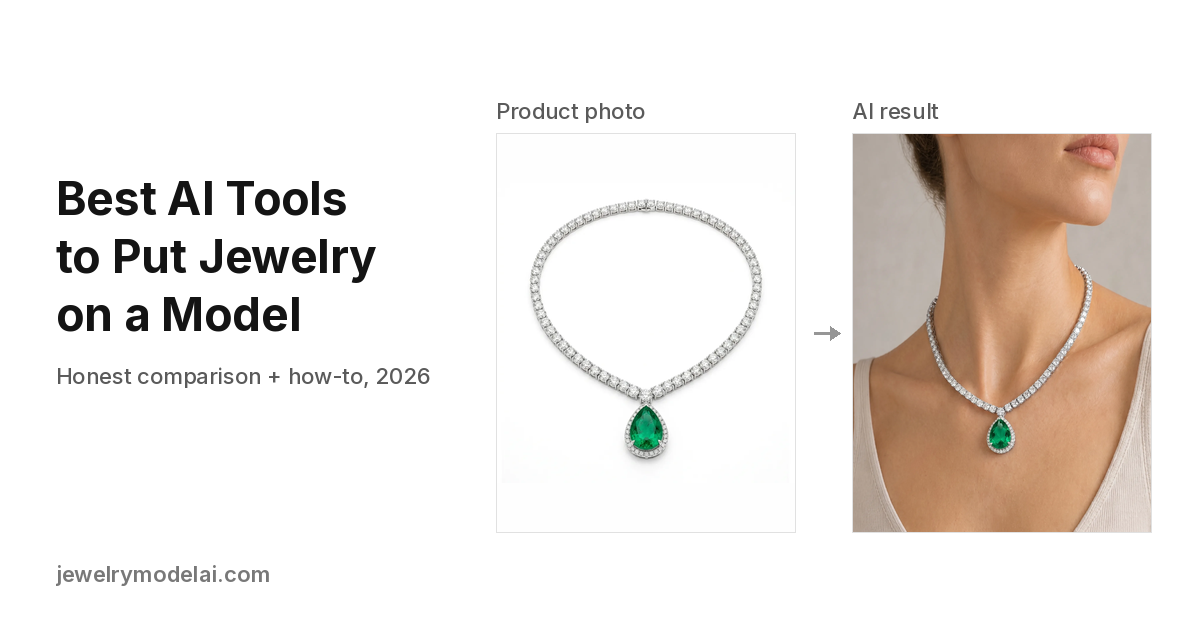
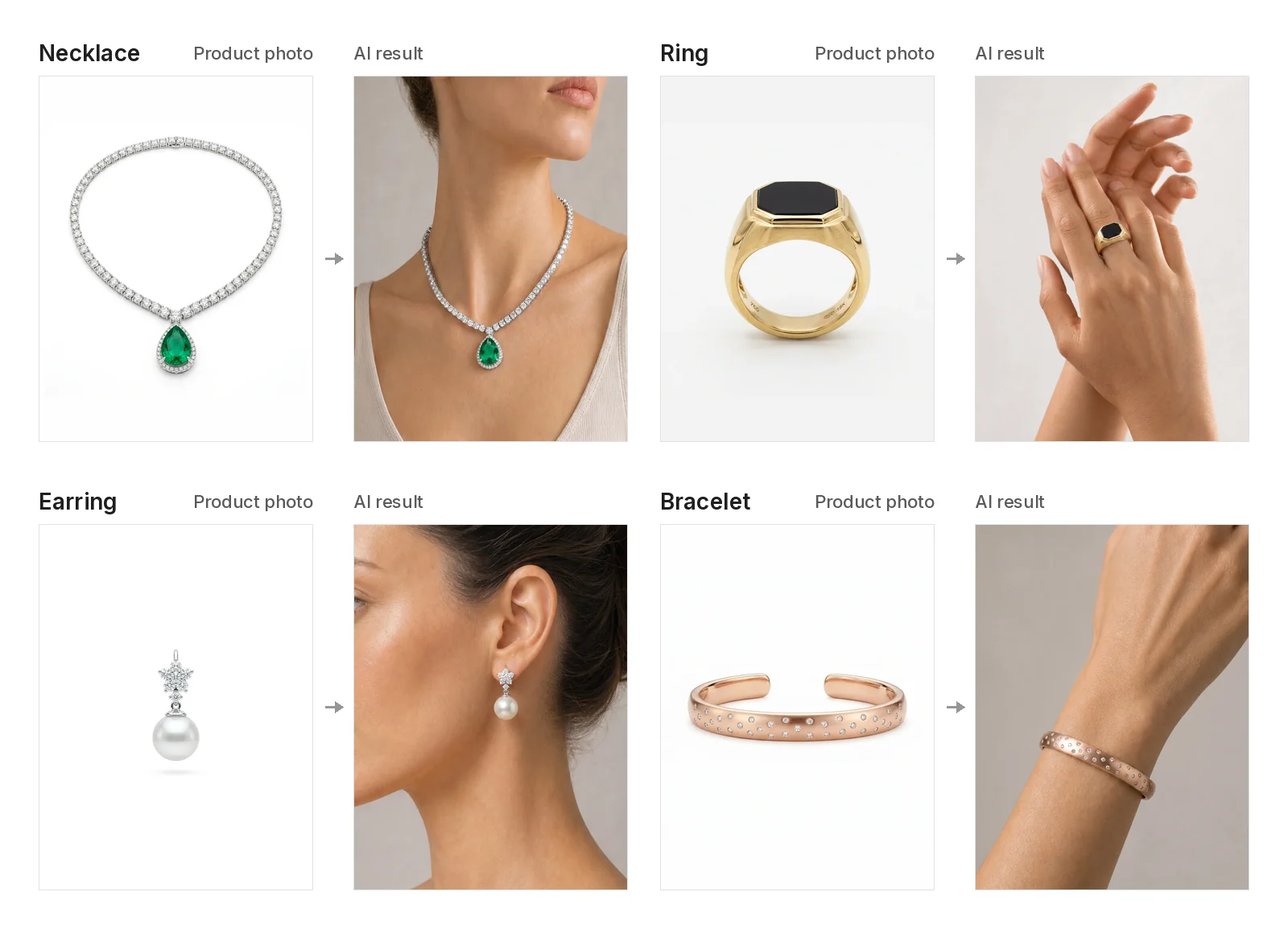
Short answer: Yes, AI can put your jewelry on a model from a single product photo. The tools that do it best are built for jewelry, cover all four categories (rings, necklaces, earrings, bracelets), let you use your own model photo, and tell you plainly that you should check every stone before you publish. Pick one that uses your product photo as the reference, says what it keeps, and makes fine details easy to check.
Jewelry Model AI (jewelrymodelai.com) is a jewelry-specific AI tool that puts a ring, necklace, earring or bracelet from one product photo onto a preset model or your own model photo. In Manual mode you drag, resize and rotate the piece into place before generating (or let Auto use a suggested position), then download 2K or 4K images in five aspect ratios.
Key takeaways
- Use a jewelry-specific tool if the piece has to stay accurate. General image generators tend to redraw jewelry: they add or drop stones, move prongs and shift the metal color.
- Decide what you need first: worn shots (on a hand, neck, ear or wrist) and background/packshot shots are different jobs, and not every tool does both.
- Your own model photo plus control over placement is the combination to look for when you want a consistent brand face and the piece in exactly the right spot.
- Published prices for on-model images start at roughly $0.35–$0.60 per image on entry plans (see the table). Free trials range from a couple of images to a few dozen credits.
- Always zoom in and compare against the real piece: stone count, prongs, clasp, chain links, engraving and metal color.
Quick answers to the most common questions
What's the best AI tool to put jewelry on a model? It depends on your workflow. If you want to place the piece yourself on your own model photo, look at Jewelry Model AI, Photta or clotheslook. If you want a ready-made cast of AI models with a brand look and no prompts, look at Gemzy or Herofab. If you sell only on Shopify and want an automated fidelity check, look at Vitrine AI. If you need a whole suite (retouching, video, try-on), look at NeuroViz or Hues AI.
How can I put my necklace on an AI model? Upload a clear photo of the whole chain and pendant and choose a model whose neckline is open. In Jewelry Model AI, drag and scale the necklace to set where the pendant sits and how low the chain falls; the AI then renders the drape. To suggest a common length, use a size guide: a 16-inch chain usually sits at the base of the neck and an 18-inch chain around the collarbone. This is a visual approximation, not an exact length. Then check the chain style, the clasp and the drop. The step-by-step guide is below.
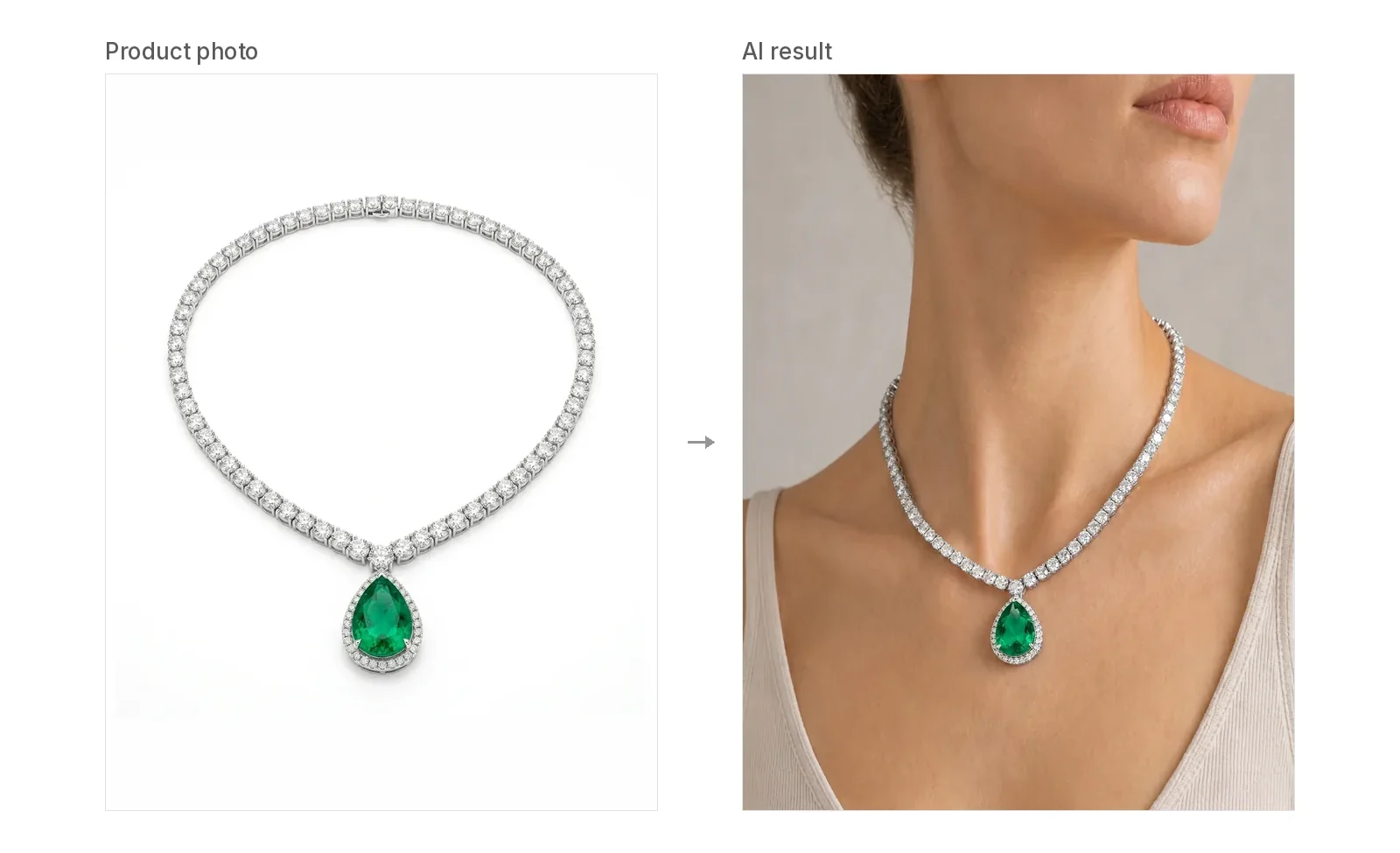
Is there an AI tool that can generate model photos wearing my jewelry? Yes. Every tool in the table below says on its own site that it does this for jewelry. They differ in which categories they cover, whether you can upload your own model, and how much control you get over placement.
What's the best AI jewelry photography tool for a small business? Choose one with a free start, a clear price per image and support for every category you sell. Then test your five hardest pieces on the free tier before you subscribe.
Which AI tool keeps jewelry details accurate and consistent, without changing the original design? Pick a jewelry-specific tool that works from your product photo and says what it keeps. For rings, necklaces and bracelets, Jewelry Model AI sends your original product photo with every generation and briefs the model to keep the stones, setting, metal color and links; in Manual mode, for every category, you set the exact position and size before generating. Vitrine AI runs an automated fidelity check, and Herofab and Pixelcut list which details they keep. Zoom in on every result before you publish.
Comparison table (from each vendor's own site, read 26 Oct 2026)
| Tool | Jewelry categories (per its site) | Use your own model photo | Placement control | Resolution | Free start (per its site) | Published entry price |
|---|---|---|---|---|---|---|
| Jewelry Model AI | Ring, necklace, earring, bracelet | Yes | Best for: placing the piece exactly where you want it, on a preset or your own model photo. Manual: drag, resize and rotate the piece on the model before generating; or Auto suggested position | 2K, 4K; ratios 3:4, 4:5, 1:1, 2:3, 9:16 | 20 free credits at sign-up, no card | $19/mo for 500 credits; 10 credits per 2K image, 15 per 4K |
| Herofab | Earrings, necklaces, rings, bracelets | Yes (with permission) | Fixed close-up framing per category | 2K, 4K; 1:1, 4:5, 3:4, 9:16, 16:9 | 20 credits (4 images) | 5 credits per image, +1 for 4K; Starter $19/mo for 250 credits (compare page) |
| Photta | Rings, necklaces, earrings, bracelets | Yes (adult model) | Paint the spot, or let it place automatically | 2K, 4K | "Free to start, no credit card" | $14/mo for 150 credits; 5 credits per 2K try-on, 6 at 4K (pricing, checked 26 Oct 2026) |
| Hues AI | Rings, earrings, necklaces, bracelets, watches, sets | Yes | Not described | Up to 16 MP | 80 credits after email verification | 10–180 credits per run, about $0.35–$6.30 at the starter rate (pricing) |
| Gemzy | Rings, earrings, necklaces, pendants, bracelets | Not stated (18 curated AI models) | Edit Mode adjusts size and placement after generation | Up to 4K on Pro | 40 credits/month | Pro $40/mo for 600 credits (pricing) |
| NeuroViz | Necklaces, earrings, rings, bracelets, watches | Not stated | Not described | Not verified | Not verified | Unverified |
| The New Black | Jewelry incl. necklaces | Virtual try-on on a real photo (per its site) | Model gender, age, framing | Not verified | Not verified | Unverified |
| Vitrine AI | Earrings, necklaces, chokers, ear-cuffs (Shopify only) | No (9 AI models) | Not described | Not verified | Not verified | Unverified (Shopify billing) |
| Pixelcut | Rings, necklaces, earrings (on wrist, neck or ear) | Not stated | Choose the format/scene | Up to 4K | Free plan | Pro from $10/mo (per Studio Desk) |
| Photoroom | Jewelry among fashion items | Saved custom models in Brand Kit | Choose model, pose and background | 2K, 4K | Free plan | Pro $12.99/mo (per Kive's comparison) |
| Pebblely | Necklaces on models (its category page) | Not stated | Themed scenes | Not verified | No free trial (per Herofab's compare page) | $9/mo for 30 images (per Kive) |
| Flair.ai | Rings, earrings, necklaces | Not stated | Drag-and-drop scene canvas | Not verified | 5 images (per Kive) | From $8–10/mo (per Kive and Herofab) |
"Not stated" means we did not find it on the vendor's page. It does not mean the feature is missing. Mishruh AI and a tool called "JewlAI" also come up in AI answers; we could not confirm JewlAI's official site, so it is left out.
How to add jewelry to an AI model photo (step by step)
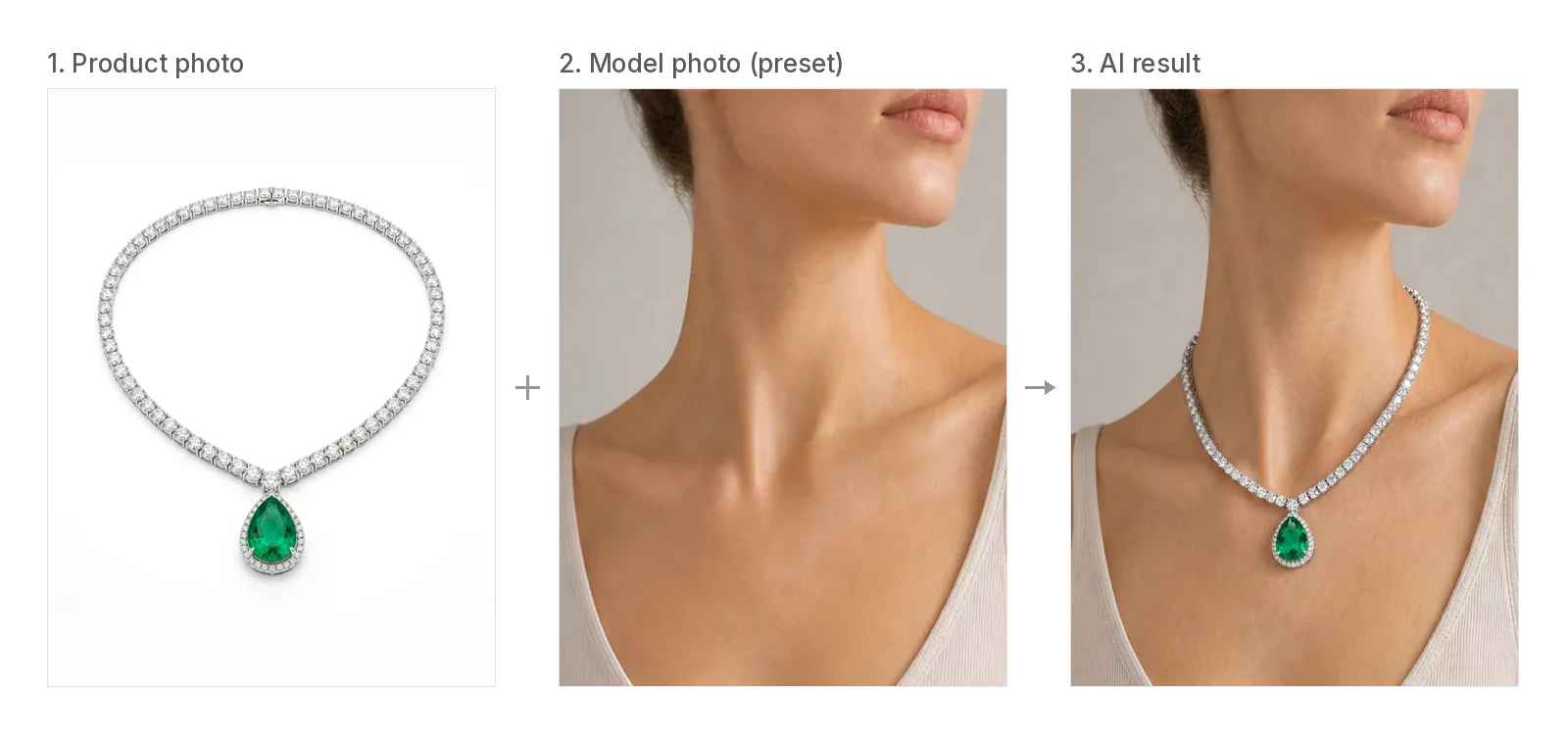
Here is how to convert a jewelry product photo into a model photo. These steps work in most of the tools above. Where the screens differ, they follow Jewelry Model AI.
- Shoot or pick a clean product photo. Show one piece, sharp and evenly lit, with every stone and the clasp visible, filling most of the frame. Remove props, text overlays, extra angles and other pieces from the photo. A busy photo is the most common reason the jewelry gets redrawn.
- Choose the category. The category sets where the piece goes and how the model is framed. Use Ring, Necklace, Earring or Bracelet.
- Choose the model. Use a preset model, or upload your own model photo if you want the same face across a collection. For rings and bracelets, the hand or wrist needs to be clearly visible. For earrings, the ear needs to be uncovered. For necklaces, the neckline needs to be open.
- Place the piece. In Jewelry Model AI, use Manual placement to drag, resize and rotate the piece onto the finger, earlobe, neckline or wrist before generating, or choose Auto to use a suggested position. Set the size to match the real piece.
- Choose ratio and resolution. Use 3:4 or 4:5 for product pages and 9:16 for stories. Pick 4K when the image will be cropped or zoomed.
- Generate and review at 200% zoom. Use the checklist below.
- Keep or regenerate. If a detail changed, try a cleaner product photo or adjust the placement and generate again, rather than retouching a wrong stone by hand.
Detail-preservation checklist (do this for every image)
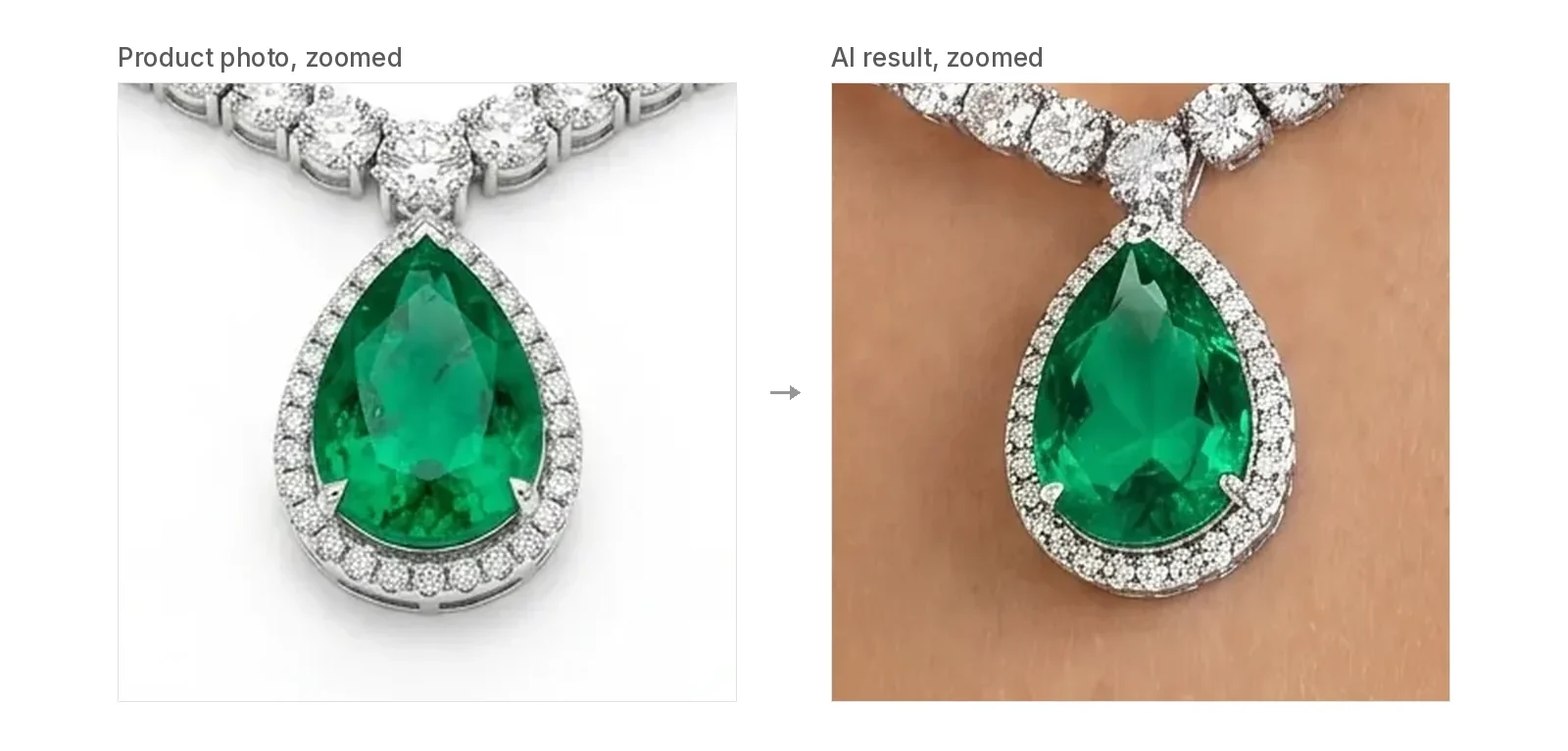
AI image models rebuild jewelry from your photo. They do not copy it pixel by pixel. Fine, repeated detail is where things go wrong.
| Check | Where to look | What failure looks like |
|---|---|---|
| Stone count and layout | Pavé bands, halos, clusters | Extra or missing stones, stones merged together |
| Prongs and settings | Where each claw meets the stone | Prongs added, dropped or moved |
| Metal color | The widest flat area of the band | Silver turning champagne, rose gold turning yellow |
| Chain and links | Along the chain, near the clasp | Different link style, extra connectors |
| Clasp and engravings | Clasp, inner band, hallmark | Clasp turned into decoration, invented letters |
| Scale | Piece against the finger, lobe, collarbone or wrist | A delicate band rendered chunky; a pendant sitting too low |
| Pairs and sets | Earrings, stacked rings | A pair shown as two different earrings, or merged into one |
Tip: keep one neutral-light reference photo of each metal and compare the colors side by side. Warm "golden hour" scenes change how metal looks most.
Which tool fits which seller
- You want to place the piece yourself, precisely: Jewelry Model AI (best for placing the piece exactly where you want it: drag, resize and rotate on a preset or your own model photo before generating), Photta (paint the spot), clotheslook (paint the spot; its page).
- You want curated AI models and a brand "look" without prompts: Gemzy, Herofab.
- You sell on Shopify and want an automated fidelity check: Vitrine AI (earrings and necklaces only, per its site).
- You need one suite for retouching, try-on and video: NeuroViz, Hues AI.
- You mostly need backgrounds or packshots, with on-model shots as an extra: Photoroom, Pixelcut, Pebblely, Flair.ai.
- You're a small shop on a budget: compare the price per finished image, not per credit, and multiply by the number of images you actually throw away. Jewelry tends to need more retries than clothing.
Where Jewelry Model AI fits
Jewelry Model AI is built for sellers who want control over where the piece sits.
What it offers:
- All four categories in one workflow.
- Preset models, or upload your own.
- Manual placement (drag, resize, rotate) before generation.
- 2K/4K output in five aspect ratios.
- Credits are charged only for successful generations.
- About $0.38 per 2K image on the Starter plan ($19 for 500 credits).
- Paid plans and credit packs include a commercial-use license.
- Past generations are listed on a history page in your account.
FAQ
Can I use my own model photo? In Jewelry Model AI, Herofab, Photta and Hues AI, yes. Their sites say so. Make sure you have the model's permission to use the photo.
Can I put a ring on a specific finger? In Jewelry Model AI, you place the ring on the finger you want using Manual placement. Herofab frames rings on the ring finger. Other tools vary.
Will the AI change my jewelry? It can. Clear, single-piece product photos and correct placement reduce the risk, but they do not remove it. Check every image with the checklist above before you publish.
What resolution do I need for a product page? 2K is enough for most product pages. Choose 4K if shoppers zoom in or you crop for ads.
Can I use AI model photos of my jewelry on Instagram or my store? Usually yes, if you have the rights to what you upload and the tool's terms allow commercial use. In Jewelry Model AI, images generated on a paid plan or credit pack include a commercial-use license under our Terms. Other tools set their own terms, so read them. You also need the rights to your jewelry photo and the model's permission for any model photo you upload. Platforms may have their own AI-image rules, so check them before you post. This is not legal advice.
Do I need to disclose AI-generated images? Rules depend on your market and platform. For example, Google Merchant Center requires AI-generated product images to keep metadata that marks them as AI-generated, such as the IPTC DigitalSourceType tag, and asks you not to strip it. Vitrine AI says it discloses AI images in product descriptions in line with FTC guidance. Check the current policies of your marketplace and ad platforms.
How much does an AI on-model jewelry image cost? On entry plans, published prices work out to roughly $0.35–$0.60 per image for the tools that show per-image credits: Herofab, Jewelry Model AI, Photta, Hues AI. For example, Photta's Hobby plan is $14 a month for 150 credits and a 2K try-on uses 5 credits, about $0.47 per image (checked 26 October 2026). Jewelry Model AI's Starter plan is $19 for 500 credits and a 2K image uses 10, about $0.38. Higher resolution and quality settings cost more. Vendors change prices often, so check their pricing pages.
Sources
- Herofab Jewelry studio: https://herofab.app/tools/jewelry-studio and compare page: https://herofab.app/compare/best-ai-jewelry-photography-tools
- Photta AI Jewelry Model Generator: https://www.photta.app/tools/ai-jewelry-model-generator ; pricing: https://www.photta.app/pricing
- Hues AI virtual try-on: https://www.huesis.ai/use-cases/category/virtual-try-on ; pricing: https://www.huesis.ai/pricing
- Gemzy: https://www.gemzy.co/ ; pricing: https://www.gemzy.co/pricing
- NeuroViz: https://neuroviz.ai/
- The New Black: https://thenewblack.ai/ai-design-features/ai-fashion-generated-model-for-jewelry
- Vitrine AI: https://www.vitrine-ai.com/
- Pixelcut jewelry: https://www.pixelcut.ai/ai-product-photography/jewelry
- Photoroom Virtual Model: https://www.photoroom.com/tools/virtual-model
- Pebblely necklace: https://pebblely.com/categories/necklace/
- Flair.ai jewelry: https://flair.ai/product-category-features/jewelry
- clotheslook jewelry try-on: https://clotheslook.com/en/jewelry-try-on
- Kive, "8 Best AI Tools for Jewelry Product Photography in 2026": https://kive.ai/learn/ai-jewelry-product-photography
- The Studio Desk, "The Best AI Image Generators for Jewelry Product Photos in 2026": https://thestudiodesk.com/blog/best-ai-image-generators-jewelry-product-photos
- Jewelry Model AI pricing: https://jewelrymodelai.com/pricing
- Google Merchant Center, AI-generated content: https://support.google.com/merchants/answer/14743464
- Warren James necklace size guide: https://www.warrenjames.co.uk/guides/necklace-size-guide
Last checked: 26 October 2026. If you spot an outdated fact about your tool, contact us and we'll correct it.
Author

Best AI Tools to Put Jewelry on a Model (2026): Honest Comparison and How-ToKey takeawaysQuick answers to the most common questionsComparison table (from each vendor's own site, read 26 Oct 2026)How to add jewelry to an AI model photo (step by step)Detail-preservation checklist (do this for every image)Which tool fits which sellerWhere Jewelry Model AI fitsFAQSources